
Hyundai Elantra (CN7): Navigation-Based Smart Cruise Control (NSCC) / Function settings
Setting
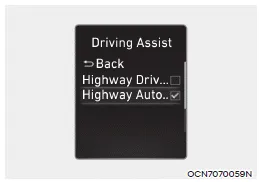
With the engine on, select ‘Driver Assistance → Driving Assist → Highway Auto Speed Change’ from the Settings menu to turn on Navigation-based Smart Cruise Control and deselect to turn off the system.
Information
When there is a problem with Navigationbased Smart Cruise Control, the function cannot be set from the Settings menu.
Navigation-based Smart Cruise Control can help automatically adjust vehicle speed when driving on highways (or motorways) by using road information from the navigation system while Smart Cruise Control is operating.
Operating conditions Navigation-based Smart Cruise Control is ready to operate if all of the following conditions are satisfied: Smart Cruise Control is operating Driving on main roads of highways (or motorways) Information For more details on how to operate Smart Cruise Control, refer to “Smart Cruise Control (SCC)� section in chapter 7.
Other information:
Hyundai Elantra (CN7) 2021-2026 Service Manual: Special service tools
Special Service Tools Tool Name / Number Illustration Description LKA Compensator(09890-3V100)Used for compensating front view camera unitBCW Sensor Correction Tool Set(09958-3T500)Used to correct the blind-spot radar unit.
Hyundai Elantra (CN7) 2021-2026 Service Manual: Troubleshooting
Diagnosis with Diagnostic tool1.In the body electrical system, failure can be quickly diagnosed by using the vehicle diagnostic system (Diagnostic tool).The diagnostic system (Diagnostic tool) provides the following information.(1)Fault Code Searching : Checking failure and code number (DTC)(2)Data Analysis : Checking the system input/output data s
Categories
- Manuals Home
- Hyundai Elantra Owners Manual
- Hyundai Elantra Service Manual
- Body (Interior and Exterior)
- Maintenance
- General Tightening Torque Table. General information
- New on site
- Most important about car
