
Hyundai Elantra (CN7): Interior Features / USB Charger
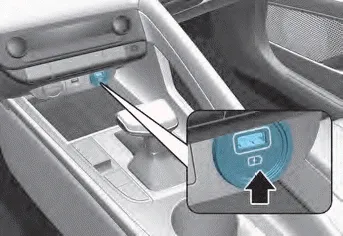
Insert the USB charger into the USB port, and re-charge a smart phone or a tablet PC.
- A charging status/charging completion message is displayed on a screen of a smart phone or a tablet PC.
- A smart phone or a tablet PC may get warmer during the re-charging process. It does not indicate any malfunction with the charging system.
- A smart phone or a tablet PC, which adopts a different re-charging method, may not be properly recharged. In this case, use an exclusive charger of your device.
- The charging terminal is only to recharge a device. Do not use the charging terminal either to turn ON an audio or to play media on the infotainment system.
The power outlet is designed to provide power for mobile telephones or other devices designed to operate with vehicle electrical systems. The devices should draw less than 180 W with the engine running.
[A] : Charging pad There is a wireless cellular phone charger inside the front console. The system is available when all doors are closed, and when the ignition switch is in the ACC/ON position.
Other information:
Hyundai Elantra (CN7) 2021-2026 Service Manual: Auto Defogging Sensor
Description DescriptionThe auto defogging sensor is installed on the front window glass. The sensor judges and sends signal if moisture occurs to blow out wind for defogging. The air conditioner control module receives signal from the sensor and restrains moisture and eliminate defog by controlling the intake actuator, A/C, auto defogging actuat
Hyundai Elantra (CN7) 2021-2026 Service Manual: Troubleshooting
TroubleshootingDiagnosis with Diagnostic tool1.In the body electrical system, failure can be quickly diagnosed by using the vehicle diagnostic system (Diagnostic tool).The diagnostic system (Diagnostic tool) provides the following information.1)Fault Code Searching : Checking failure and code number (DTC)2)Data Analysis : Checking the system input/
Categories
- Manuals Home
- Hyundai Elantra Owners Manual
- Hyundai Elantra Service Manual
- Body (Interior and Exterior)
- Maintenance
- Rear Seats
- New on site
- Most important about car
