
Hyundai Elantra (CN7): Driving Safety / Blind-Spot Collision-Avoidance Assist (BCA)
Blind-Spot Collision-Avoidance Assist is designed to help detect and monitor approaching vehicles in the driver’s blind spot area and warn the driver of a possible collision with a warning message and audible warning.
In addition, if there is a risk of collision when changing lanes or driving forward out of a parking space, the system will help avoid a collision by applying the brake.
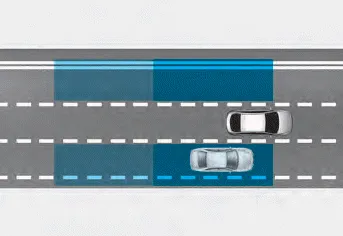
Blind-Spot Collision-Avoidance Assist helps detect and inform the driver that a vehicle is in the blind spot.
CAUTION
The detecting range may vary depending on the speed of your vehicle. However, even if there is a vehicle in the blind spot area, the function may not warn you when you pass by at high speeds.
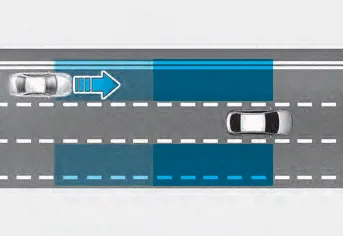
Blind-Spot Collision Assist helps detect and informs the driver that a vehicle is approaching at high speed from the blind spot area.
CAUTION
Warning timing may vary depending on the speed of the vehicle approaching at high speed.

When changing lanes by detecting the lane ahead, if the system judges that there is a collision risk with an approaching vehicle in the blind spot, the function will help avoid a collision by applying the brake.
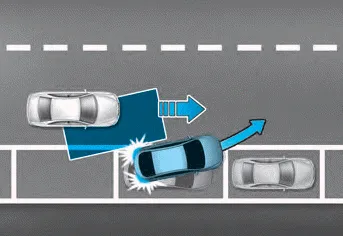
When you are driving forward out of a parking space, if the system judges that there is a collision risk with an approaching vehicle in the blind spot, the function will help avoid a collision by applying the brake.
Information
In the following text, Blind-Spot Collision- Avoidance Assist will be referred as Blind- Spot Safety system.
Detecting sensor
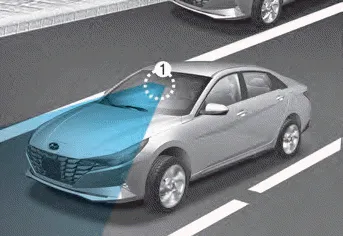
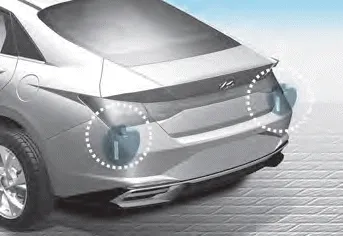
[1] : Front view camera, [2] : Rear corner radar
Refer to the picture above for the detailed location of the detecting sensors.
CAUTION
Take the following precautions to maintain optimal performance of the detecting sensor:
- Never disassemble the rear corner radar or radar assembly, or apply any impact on it.
- If there is impact on the rear corner radar or near the radar, even though the warning message does not appear on the cluster, Blind-Spot Safety system may not operate properly. We recommend that the system be inspected by an authorized HYUNDAI dealer.
- If the rear corner radars have been replaced or repaired, we recommend that the vehicle be inspected by an authorized HYUNDAI dealer.
- Use only genuine parts to repair the rear bumper where the rear corner radar is located.
- Do not apply license plate frame or objects, such as a bumper sticker, film or a bumper guard near the rear corner radar.
- The function may not work properly if the bumper has been replaced, or the surroundings of the rear corner radar has been damaged or paint has been applied.
- If a trailer, carrier, etc. is installed, it may adversely affect the performance of the rear corner radar or the system may not operate.
Blind-Spot Safety system may not operate normally, or the system may operate unexpectedly under the following circumstances: There is inclement weather, such as heavy snow, heavy rain, etc.
Setting Blind-Spot Safety With the engine on, select or deselect ‘Driver Assistance → Blind-Spot Safety’ from the Settings menu to set whether or not to use each function.
Other information:
Hyundai Elantra (CN7) 2021-2026 Service Manual: Troubleshooting
TroubleshootingWireless Power Charger System Troubleshooting Trouble status Inspection item Inspection Not chargedCheck the mobile phone status R-1Amber LED blinks OvercurrentR-2OverheatingR-2Foreign matterR-2R-1.
Hyundai Elantra (CN7) 2021-2026 Service Manual: Specification
S
Categories
- Manuals Home
- Hyundai Elantra Owners Manual
- Hyundai Elantra Service Manual
- Brake System
- Specifications
- Engine Mechanical System
- New on site
- Most important about car
