
Hyundai Elantra (CN7): Automatic Climate Control System / Automatic heating and air conditioning
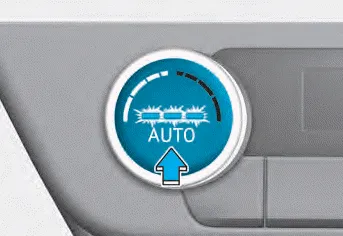
1. Press the AUTO button
The modes, fan speeds, air intake and air-conditioning will be controlled automatically according to the temperature setting you select.
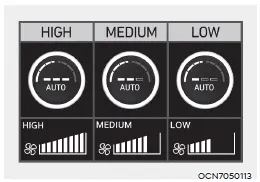
You can control the blower strength in three stages by pushing the AUTO button during automatic operation.
-- HIGH : Provide rapid air conditioning
and heating with strong blower
-- MEDIUM : Provide air conditioning
and heating with medium strength
blower
-- LOW : It is suitable for drivers who
prefer to soft blower.
When you select the temperature to HI or LO in AUTO mode, the wind strength is set to ‘HIGH’.
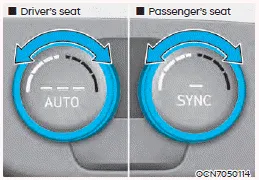
2. Turn the temperature control knob to set the desired temperature. If the temperature is set to the lowest setting (Lo), the air conditioning system will operate continuously.
- To turn the automatic operation off,
select any button of the following:
-- Mode selection button
-- Front windshield defroster button (Press the button one more time to deselect the front windshield defroster function. The ‘AUTO’ sign will illuminate on the information screen once again.)
-- Fan speed control toggle switch The selected function will be controlled manually while other functions operate automatically. - For your convenience and overall system efficiency, use the AUTO button and set the temperature to 22°C (72°F).

Information
Never place anything near the sensor to ensure better control of the heating and cooling system.
1. Driver’s temperature control knob 2. Passenger’s temperature control knob 3. AUTO (automatic control) button 4. SYNC button 5. OFF button 6.
The heating and cooling system can be controlled manually by pushing buttons other than the AUTO button. In this case, the system works sequentially according to the order of buttons selected.
Other information:
Hyundai Elantra (CN7) 2021-2026 Service Manual: A/C Pressure Transducer
Description and operation DescriptionThe A/C Pressure Transducer (APT) converts the pressure value of high pressure line into voltage value after measuring it. By converted voltage value, engine ECU controls the cooling fan by operating it high speed or low speed.
Hyundai Elantra (CN7) 2021-2026 Service Manual: Special service tools
Special Service Tools Tool Name / Number Illustration Description LKA Compensator(09890-3V100)Used for compensating front view camera unitBCW Sensor Correction Tool Set(09958-3T500)Used to correct the blind-spot radar unit.
Categories
- Manuals Home
- Hyundai Elantra Owners Manual
- Hyundai Elantra Service Manual
- Maintenance
- Integrated Thermal Management Module (ITM)
- Front Radar Unit
- New on site
- Most important about car
