
Hyundai Elantra (CN7): Lane Following Assist (LFA) / Function settings
Setting
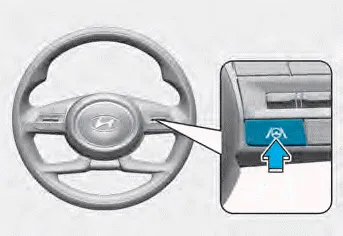
Turning the function ON/OFF
With the engine on, shortly press the
Lane Driving Assist button located on the
steering wheel to turn on Lane Following
Assist. The white or green
 indicator
light will illuminate on the cluster.
Press the button again to turn off the
system.
indicator
light will illuminate on the cluster.
Press the button again to turn off the
system.
If the engine is restarted, Lane Following Assist will maintain the last setting.
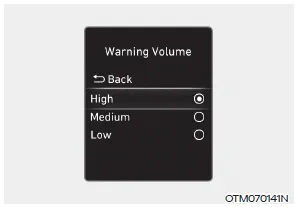
Warning Volume
With the engine on, select ‘Driver Assistance → Warning Volume’ from the Settings menu to change the Warning Volume to ‘High’, ‘Medium’ or ‘Low’ for Hands-off warning.
If you change the Warning Volume, the Warning Volume of other Driver Assistance systems may change.
Lane Following Assist is designed to help detect lane markings and/or vehicles on the road, and assists the driver’s steering to help center the vehicle in the lane.
Warning and control Lane Following Assist If the vehicle ahead and/or both lane markings are detected and your vehicle speed is below 112 mph (180 km/h), the green indicator light will illuminate on the cluster, and the function will help center the vehicle in the lane by assisting the steering wheel.
Other information:
Hyundai Elantra (CN7) 2021-2026 Service Manual: Components and components location
C
Hyundai Elantra (CN7) 2021-2026 Service Manual: Rear View Monitor (RVM)
Description and operation DescriptionRear view camera will activate when the backup light is ON with the ignition switch ON and the shift lever in the R position.This system is a supplemental system that shows behind the vehicle through the AV monitor or the ECM (Reverse Display Room Mirror) mirror while backing-up.
Categories
- Manuals Home
- Hyundai Elantra Owners Manual
- Hyundai Elantra Service Manual
- Drive Mode
- Front Radar Unit
- Engine Control / Fuel System
- New on site
- Most important about car
