
Hyundai Elantra (CN7): Convenient Features / High Beam Assist (HBA)
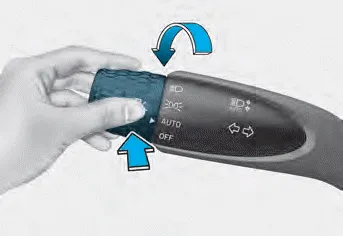
High Beam Assist will automatically adjust the headlamp range (switches between high beam and low beam) depending on the brightness of detected vehicles and certain road conditions.
Detecting sensor (Front view camera)
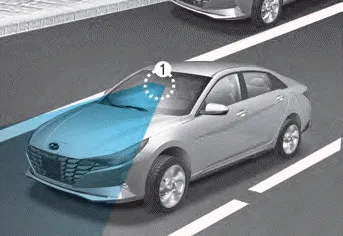
[1] : Front view camera
The front view camera is used as a detecting sensor to help detect ambient light and brightness while driving.
Refer to the picture above for the detailed location of the detecting sensor.
NOTICE
Always keep the front view camera in good condition to maintain optimal performance of High Beam Assist. For more details on the precautions of the front view camera, refer to “Forward Collision-Avoidance Assist (FCA)� section in chapter 7.
Function settings
With the engine on, select ‘Lights → High Beam Assist (or HBA (High Beam Assist))’ from the Settings menu to turn on High Beam Assist and deselect to turn off the system.
WARNING
For your safety, change the Settings after parking the vehicle at a safe location.
If you place the ignition switch in the ACC or OFF position with the headlamps ON, the headlamps (and/or parking lamps) remain on for about 5 minutes.
Display and control • After selecting ‘High Beam Assist’ in the Settings menu, High Beam Assist will operate by following the procedure below.
Other information:
Hyundai Elantra (CN7) 2021-2026 Service Manual: Components and positions
C
Hyundai Elantra (CN7) 2021-2026 Service Manual: Troubleshooting
Diagnosis with Diagnostic tool1.In the body electrical system, failure can be quickly diagnosed by using the vehicle diagnostic system (Diagnostic tool).The diagnostic system (Diagnostic tool) provides the following information.(1)Fault Code Searching : Checking failure and code number (DTC)(2)Data Analysis : Checking the system input/output data s
Categories
- Manuals Home
- Hyundai Elantra Owners Manual
- Hyundai Elantra Service Manual
- Front Radar Unit
- Instrument Panel Overview
- Integrated Thermal Management Module (ITM)
- New on site
- Most important about car
