
Hyundai Elantra (CN7): Exterior Lights / Turn signals and lane change signals
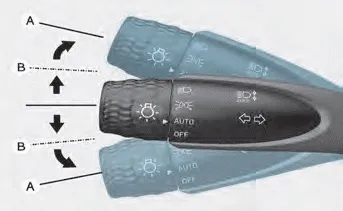
To signal a turn, push down on the lever for a left turn or up for a right turn in position (A). To signal a lane change, move the turn signal lever slightly and hold it in position (B). The lever will return to the OFF position when released or when the turn is completed.
If an indicator stays on and does not flash or if it flashes abnormally, one of the turn signal bulbs may be burned out and will require replacement.
One touch turn signal function
To activate a one-touch turn signal function, move the turn signal lever slightly and then release it. The lane change signals will blink 3, 5 or 7 times.
You can activate or deactivate the One Touch Turn Signal function or choose the number of blinks (3, 5, or 7) from the User Settings Mode on the LCD display.
For more details, refer to “LCD Display Modes� in chapter 4. If your vehicle is equipped with additional navigation, please refer to the infotainment system manual separately supplied.
To turn on the high beam headlamp, push the lever away from you. The lever will return to its original position. The high beam indicator will light when the headlamp high beams are switched on.
The purpose of this feature is to help prevent the battery from being discharged. The system automatically turns off the parking lamp when the driver turns the vehicle off and opens the driver-side door.
Other information:
Hyundai Elantra (CN7) 2021-2026 Service Manual: Description and operation
DescriptionThe cruise control system is engaged by the cruise "ON/OFF" main switch located on right of steering wheel column. The system has the capability to cruise, coast, accelerate and resume speed.It also has a safety interrupt, engaged upon depressing brake or shifting select lever.
Hyundai Elantra (CN7) 2021-2026 Service Manual: Troubleshooting
TroubleshootingDiagnosis with Diagnostic tool1.In the body electrical system, failure can be quickly diagnosed by using the vehicle diagnostic system (Diagnostic tool).The diagnostic system (Diagnostic tool) provides the following information.1)Fault Code Searching : Checking failure and code number (DTC)2)Data Analysis : Checking the system input/
Categories
- Manuals Home
- Hyundai Elantra Owners Manual
- Hyundai Elantra Service Manual
- Front Bumper
- Rear Seats
- Instrument Panel Overview
- New on site
- Most important about car
