
Hyundai Elantra (CN7): Body Electrical System / Electro Chromic Inside Rear View Mirror
Description and operation
| Description |
| 1. | The forward facing sensor sees if the brightness of the surroundings is low enough for the mirror to operate its function. |
| 2. | The rearward looking sensor detects glaring of the reflecting light from a vehicle behind. |
| 3. | The ECM is darkened to the level as determined by the rearward looking sensor. When the glaring is no longer detected, the mirror stops functioning.
|

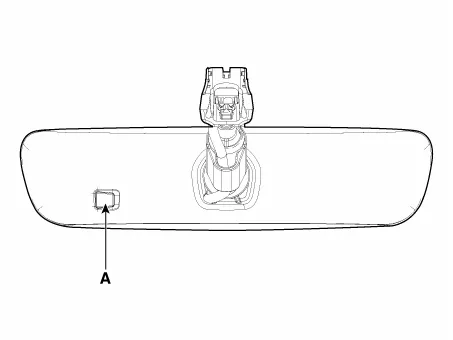
| Automatic-dimming Function |
| 1. | Pressing and holding the Feature Control button for more than 3 but less than 6 seconds turns the auto-dimming function OFF which is indicated by the green Status Indicator LED turning off. |
| 2. | Pressing and holding the Feature Control button again for more than 3 but less than 6 seconds turns the auto-dimming function ON which is indicated by the green Status Indicator LED turning on.
|

Components and components location
| Components (1) |
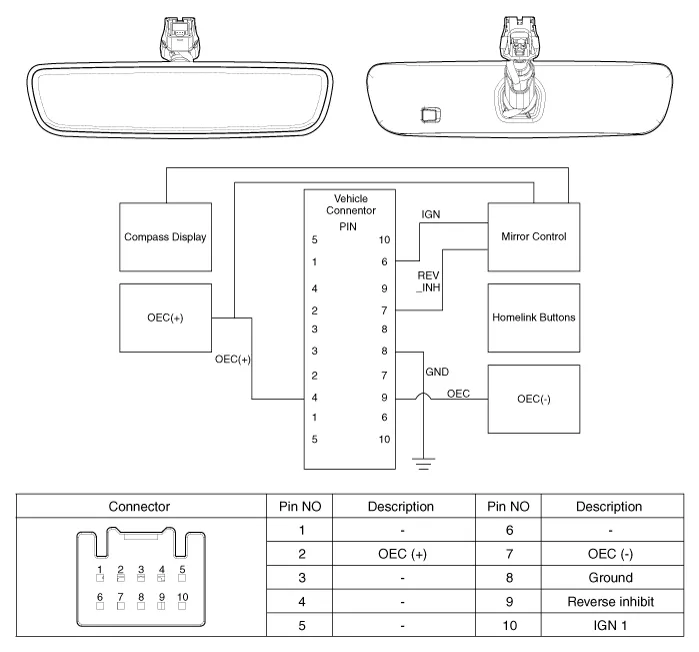
Repair procedures
| Inspection |
| 1. | Turn the ignition key to the "ON" position. |
| 2. | Cover the forward facing sensor. |
| 3. | Head a light to the rearward looking sensor. |
| 4. | The ECM should be darkened as soon as the rearward looking sensor detects the light.
|
| 5. | When the reverse gear is engaged, the ECM should not be darkened. When heading lights to both the forward facing and rearward looking sensors, the ECM should not be darkened. |
| Removal |
| 1. | Remove the inside rear view mirror cover (A).
|
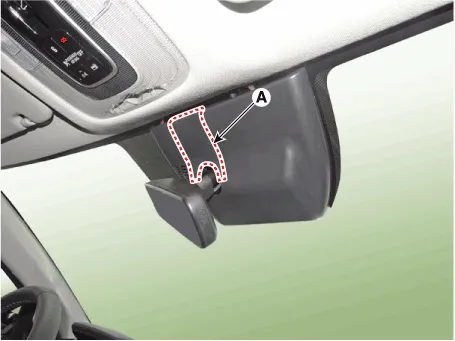
| 2. | Using a remover and remove the rain sensor cover (A).
|

| 3. | Disconnect the inside rear view mirror connector (A).
|
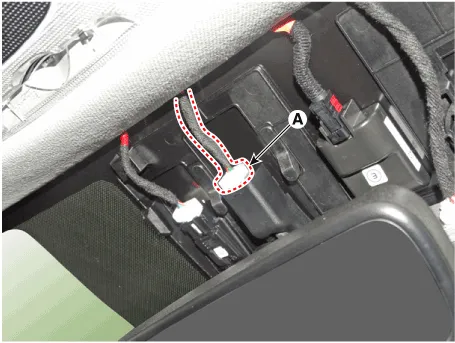
| 4. | Loosen the mounting screw and remove the inside rear view mirror (A).
|
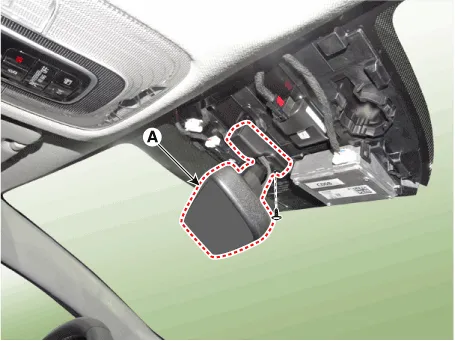
| Installation |
| 1. | Install the mirror making sure the mounting bracket not to be damaged. |
| 2. | Install the mirror wiring cover and rain sensor cover after reconnecting the connector and tightening the screw. |
Description and operation DescriptionIntegrated Rain SensorIntegrated rain sensor (A) controls three systems: front wiper, auto-light, and central air conditioner.
Components and components location Component Location1. Sunroof2. Sunroof switch3. Sunroof motor & controller Schematic diagrams Circuit Diagram Sunroof Switch Repair procedures Inspection1.
Other information:
Hyundai Elantra (CN7) 2021-2026 Service Manual: A/C Pressure Transducer
Description and operation DescriptionThe A/C Pressure Transducer (APT) converts the pressure value of high pressure line into voltage value after measuring it. By converted voltage value, engine ECU controls the cooling fan by operating it high speed or low speed.
Hyundai Elantra (CN7) 2021-2026 Service Manual: Heater Control Unit
Components and components location Component Location1. Heater control unitComponents[Connector A] Pin No Function Pin No Function 1Mode control actuator (Feedback)21Mode control actuator (Vent)2Intake actuator (Feedback)22Mode control actu
Categories
- Manuals Home
- Hyundai Elantra Owners Manual
- Hyundai Elantra Service Manual
- Fuse/Relay Panel Description. Engine compartment fuse panel
- Integrated Thermal Management Module (ITM)
- Front Radar Unit
- New on site
- Most important about car
