
Hyundai Elantra (CN7): Infotainment System / Bluetooth® Wireless Technology hands-free
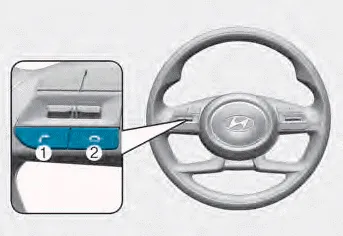
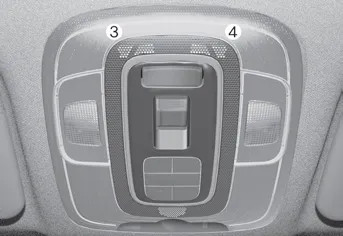
You can use the phone wirelessly by using the Bluetooth® Wireless Technology.
(1) Call / Answer button
(2) Call end button
(3) LHD Microphone
(4) RHD Microphone
- Audio : For detailed information, refer to “AUDIO� in this chapter.
- Navigation : Detailed information for the Bluetooth® Wireless Technology hands-free is described in the manual supplied separately
A wide range of infotainment functions can be commanded with voice recognition.
FM reception AM and FM radio signals are broadcast from transmitter towers located around your city. They are intercepted by the radio antenna on your vehicle.
Other information:
Hyundai Elantra (CN7) 2021-2026 Service Manual: In-car Sensor
Description and operation DescriptionThe In-car air temperature sensor is built in the heater & A/C control unit.The sensor contains a thermistor which measures the temperature of the inside. The signal decided by the resistance value which changes in accordance with perceived inside temperature, is delivered to heater control unit and accor
Hyundai Elantra (CN7) 2021-2026 Service Manual: Auto Defogging Sensor
Description DescriptionThe auto defogging sensor is installed on the front window glass. The sensor judges and sends signal if moisture occurs to blow out wind for defogging. The air conditioner control module receives signal from the sensor and restrains moisture and eliminate defog by controlling the intake actuator, A/C, auto defogging actuat
Categories
- Manuals Home
- Hyundai Elantra Owners Manual
- Hyundai Elantra Service Manual
- Driver assistance system
- General Tightening Torque Table. General information
- Fuse/Relay Panel Description. Engine compartment fuse panel
- New on site
- Most important about car
