
Hyundai Elantra (CN7): Remote Key / Battery replacement
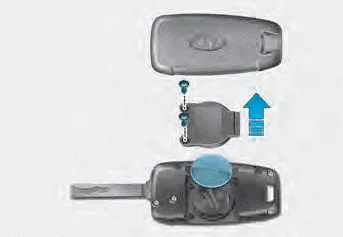
If the remote key is not working properly, try replacing the battery with a new one.
Battery Type: CR2032
To replace the battery:
1. Insert a slim tool into the slot and gently pry open the cover.
2. Using a screw driver, remove the battery cover.
3. Remove the old battery and insert the new battery. Make sure the battery position is correct.
4. Reinstall the battery cover and key cover in the reverse order of removal.
If you suspect your remote key might have sustained some damage, or you feel your remote key is not working correctly contact an authorized HYUNDAI dealer.
Information
An inappropriately disposed battery can be harmful to the environment and human health. Dispose of the battery according to your local law(s) or regulation.
The remote key will not work if any of the following occur: The key is in the ignition switch. You exceed the operating distance limit (about 33 feet [10 m]).
Your HYUNDAI uses a smart key, which you can use to lock or unlock a door (and trunk) and even start the engine even just carrying the key. (1) Door Lock (2) Door Unlock (3) Trunk Open (4) Panic (5) Remote Start
Other information:
Hyundai Elantra (CN7) 2021-2026 Service Manual: Ignition Switch Assembly. Repair procedures
Repair procedures Replacement1.Disconnect the negative (-) battery terminal.2.Remove the crash pad lower panel.(Refer to Body - "Crash Pad")3.Remove the steering column upper & Lower shroud.4.Remove the ignition switch and disconnecting the Key Warning / immobilizer connector.
Hyundai Elantra (CN7) 2021-2026 Service Manual: Parking Distance Warning (PDW)
Description and operation Description• PDW consists of 8 sensors (front : 4 units, rear : 4 units) that are used to detect obstacles and transmit the result in three separate warning levels, the first, second and third to IBU via LIN communication.
Categories
- Manuals Home
- Hyundai Elantra Owners Manual
- Hyundai Elantra Service Manual
- Function settings
- Engine Control / Fuel System
- Rear Seats
- New on site
- Most important about car
