
Hyundai Elantra (CN7): Brake System / Brake bleeding procedures
| Brake System Bleeding |
|

| 1. | Make sure the brake fluid in the reservoir is at the MAX (upper) level line. |
| 2. | Have someone slowly pump the brake pedal several times, and then apply pressure. |
| 3. | Loosen the right-rear brake bleed screw (A) to allow air to escape from the system. Then tighten the bleed screw securely. [Front]
[Rear torsion beam parking cable type]
[Rear torsion beam EPB type]
[Rear multi link parking cable type]
[Rear multi link EPB type]
[Rear drum brake type]
|
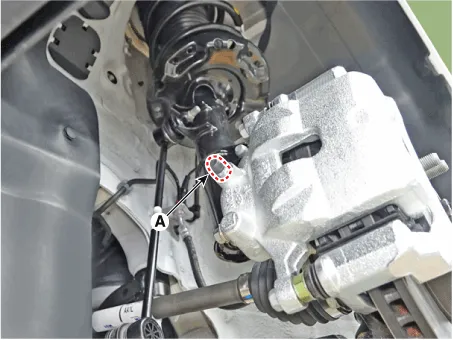
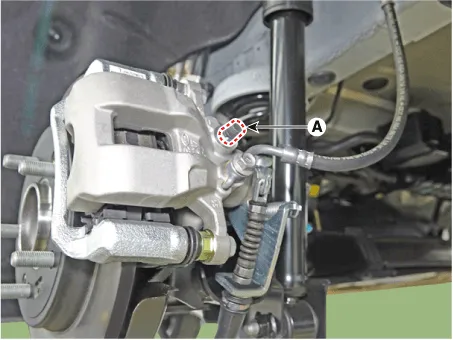

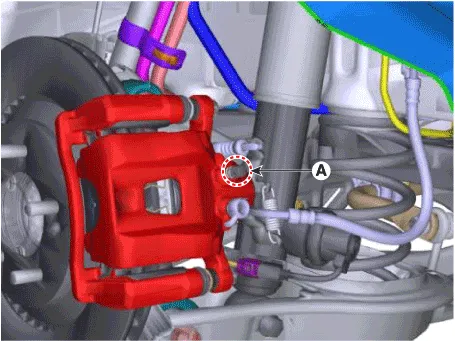

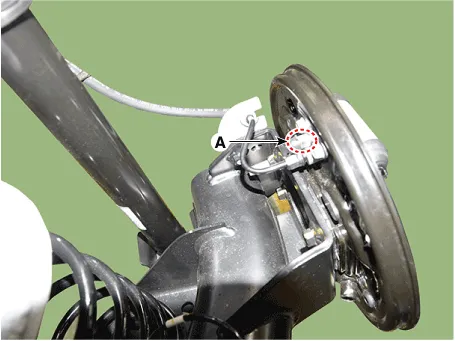
| 4. | Repeat the procedure for wheel in the sequence shown below until air bubbles no longer appear in the fluid. |
| 5. | Follow the sequence as shown below.
|
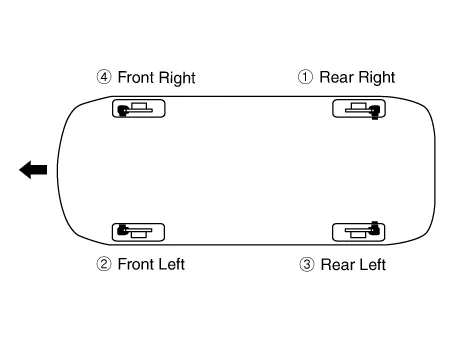
| 6. | Refill the master cylinder reservoir to MAX (upper) level line. |
| 1. | Remove the reservoir cap and fill the brake reservoir with brake fluid.
|
| 2. | Connect a clear plastic tube to the wheel cylinder bleeder plug and insert the other end of the tube into a half filled clear plastic bottle. |
| 3. | Connect the diagnostic tool to the data link connector located underneath the dash panel. |
| 4. | Select and operate according to the instructions on the diagnostic tool screen.
|

| 5. | Have someone slowly pump the brake pedal several times, and then apply pressure. |
| 6. | Pump the brake pedal several times, and then loosen the bleeder screw until fluid starts to run out without bubbles. Then close the bleeder screw (A). [Front]
[Rear torsion beam parking cable type]
[Rear torsion beam EPB type]
[Rear multi link parking cable type]
[Rear multi link EPB type]
[Rear drum brake type]
|
| 7. | Repeat the procedure for wheel in the sequence shown below until air bubbles no longer appear in the fluid. |
| 8. | Follow the sequence as shown below.
|
| 9. | Refill the master cylinder reservoir to MAX (upper) level line. |
Special Service Tools Tool (Number and Name) Illustration Use 09581-11000Piston expanderSpreading the front disc brake piston.
Other information:
Hyundai Elantra (CN7) 2021-2026 Service Manual: General safety information and caution
General Safety Information and Caution1.Be careful when driving the vehicle using the smart cruise control system as follows.(1)On curves or inclines/declines• The smart cruise control system may have limits to detect distance to the vehicle ahead due to road and traffic conditions.
Hyundai Elantra (CN7) 2021-2026 Service Manual: Description and operation
DescriptionRear Corner Radar is a system that measures the relative speed and distance from the following vehicles by using two electromagnetic wave radar sensors attached to the rear bumper, and detects any vehicle within the blind spot zone and gives off alarm.
Categories
- Manuals Home
- Hyundai Elantra Owners Manual
- Hyundai Elantra Service Manual
- Vehicle Information
- Driver assistance system
- Instrument Cluster
- New on site
- Most important about car
