
Hyundai Elantra (CN7): Drive Mode Integrated Control System / Smart shift on trip computer
Select the Trip Computer mode (
 )
on the instrument cluster LCD display
and move to the smart shift screen.
Then, the driver can see the drive mode
selected and the drive mode which is
automatically switched by the SMART
mode.
)
on the instrument cluster LCD display
and move to the smart shift screen.
Then, the driver can see the drive mode
selected and the drive mode which is
automatically switched by the SMART
mode.
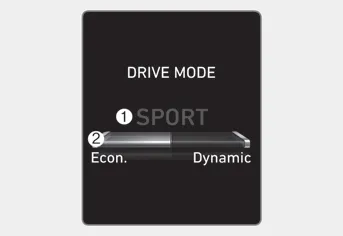
The drive mode selected by the driver (1) and the driving style gauge (2) showing the driver’s driving style are displayed on the screen.
Driver’s style gauge in SMART mode
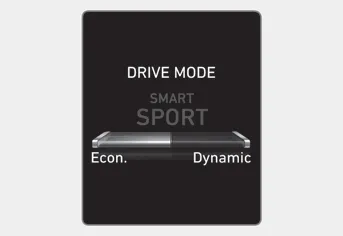
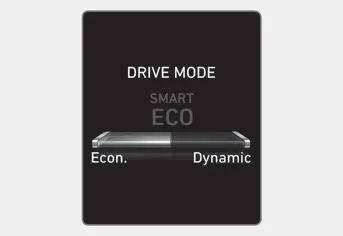
With the standard driving style in the center, the left side of the gauge is ‘Econ.’ and right side is ‘Dynamic’ style.
When the left side of the driver’s style gauge is filled up and after a certain time passes, the SMART ECO mode is activated automatically. When the right side of the gauge is filled up and sporty driving condition is detected, the SMART SPORT mode is activated.
To maintain the SMART ECO mode for fuel efficiency, drive with the left side of the gauge filled up.
The drive mode may be selected according to the driver’s preference or road condition. Information If there is a problem with the instrument cluster, the drive mode will be in COMFORT mode and may not change to NORMAL mode or SPORT mode.
Hazardous Driving Conditions When hazardous driving elements are encountered such as water, snow, ice, mud and sand, take the below suggestions: Drive cautiously and keep a longer braking distance.
Other information:
Hyundai Elantra (CN7) 2021-2026 Service Manual: Rear Combination Lamp
Repair procedures RemovalOutside Combination Lamp1.Disconnect the negative (-) battery terminal.2.Remove the combination lamp cover (A).3.Disconnect the rear combination lamp connector (A).4.Loosen the mounting nuts and remove the rear conbination lamp (A).
Hyundai Elantra (CN7) 2021-2026 Service Manual: Parking Distance Warning (PDW)
Description and operation Description• PDW consists of 8 sensors (front : 4 units, rear : 4 units) that are used to detect obstacles and transmit the result in three separate warning levels, the first, second and third to IBU via LIN communication.
Categories
- Manuals Home
- Hyundai Elantra Owners Manual
- Hyundai Elantra Service Manual
- Instrument Cluster
- Rear Seats
- Specifications
- New on site
- Most important about car
