
Hyundai Elantra (CN7): Reverse Parking Collision-Avoidance Assist (PCA) / Function settings
Setting
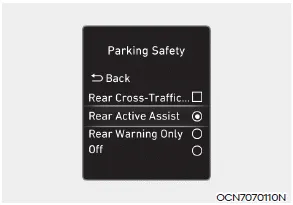
Parking Safety
With the Engine Start/Stop button in the ON position, select or deselect ‘Driver Assistance → Parking Safety’ from the Settings menu to set whether or not to use each function.
-- If ‘Rear Active Assist’ is selected, the
function will warn the driver and assist
with braking when a collision with a
pedestrian or an object is imminent.
-- If ‘Rear Warning Only’ is selected, the
function will warn the driver when
a collision with a pedestrian or an
object is imminent. Braking will not be
assisted.
-- If ‘Off’ is selected, the function will
turn off.
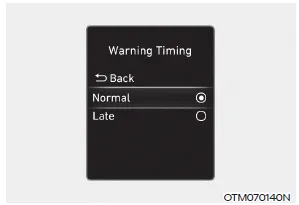
Warning Timing
With the Engine Start/Stop button in the ON position, select ‘Driver Assistance → Warning Timing’ from the Settings menu to change the initial warning activation time for Reverse Parking Collision- Avoidance Assist.
When the vehicle is first delivered, Warning Timing is set to ‘Normal’. If you change the Warning Timing, the warning time of other Driver Assistance systems may change.
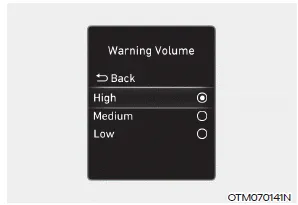
Warning Volume
With the Engine Start/Stop button in the ON position, select ‘Driver Assistance → Warning Volume’ from the Settings menu to change the Warning Volume to ‘High’, ‘Medium’, ‘Low’ or ‘Off’ for Reverse Parking Collision-Avoidance Assist.
However, when Warning Volume is turned off, the steering wheel vibration function will turn on if it was turned off.
If you change the Warning Volume, the Warning Volume of other Driver Assistance systems may change.
Reverse Parking Collision-Avoidance Assist can warn the driver or can assist with braking to help reduce the possibility of collision with a pedestrian or an object when backing up.
Operating conditions If ‘Active Assist’ or ‘Warning Only’ is set from the Settings menu, Reverse Parking Collision-Avoidance Assist will be in the ready status when the following conditions are satisfied: -- The tailgate is closed -- The gear is shifted to R (Reverse) -- Vehicle speed is below 6 mph (10 km/h) -- System components such as the rear view camera and the rear ultrasonic sensors are in normal conditions Warning Only If the function detects a risk of collision with a pedestrian or an object, the system will warn the driver with an audible warning, steering wheel vibration and warning message on the cluster.
Other information:
Hyundai Elantra (CN7) 2021-2026 Service Manual: Ignition Switch Assembly. Repair procedures
Repair procedures Replacement1.Disconnect the negative (-) battery terminal.2.Remove the crash pad lower panel.(Refer to Body - "Crash Pad")3.Remove the steering column upper & Lower shroud.4.Remove the ignition switch and disconnecting the Key Warning / immobilizer connector.
Hyundai Elantra (CN7) 2021-2026 Service Manual: Components and components location
C
Categories
- Manuals Home
- Hyundai Elantra Owners Manual
- Hyundai Elantra Service Manual
- Front Bumper
- Troubleshooting
- Rear Seats
- New on site
- Most important about car
