
Hyundai Elantra (CN7): Exterior Lights / High beam operation
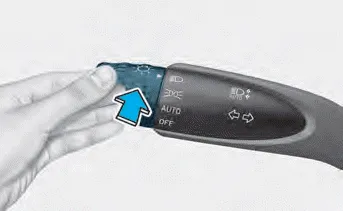
To turn on the high beam headlamp, push the lever away from you. The lever will return to its original position.
The high beam indicator will light when the headlamp high beams are switched on.
To turn off the high beam headlamp, pull the lever towards you. The low beams will turn on.
WARNING
Do not use high beam when there are other vehicles approaching you. Using high beam could obstruct the other driver’s vision.
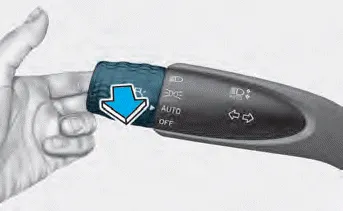
To flash the high beam headlamp, pull the lever towards you, then release the lever. The high beams will remain ON as long as you hold the lever towards you.
To operate the lights, turn the knob at the end of the control lever to one of the following positions: 1. OFF position 2. AUTO headlamp position 3.
To signal a turn, push down on the lever for a left turn or up for a right turn in position (A). To signal a lane change, move the turn signal lever slightly and hold it in position (B).
Other information:
Hyundai Elantra (CN7) 2021-2026 Service Manual: Special service tools
Special Service Tools Tool Name / Number Illustration Description LKA Compensator(09890-3V100)Used for compensating front view camera unitBCW Sensor Correction Tool Set(09958-3T500)Used to correct the blind-spot radar unit.
Hyundai Elantra (CN7) 2021-2026 Service Manual: Description and operation
Description and operation The System may be limited when • The radar sensor or camera is blocked with a foreign object or debris.• The camera lens is contaminated due to tinted filmed or coated windshield, damaged glass, or stuck of foreign matter (sticker, bug, etc.
Categories
- Manuals Home
- Hyundai Elantra Owners Manual
- Hyundai Elantra Service Manual
- Rear Seats
- Brake bleeding procedures
- Instrument Cluster
- New on site
- Most important about car
