
Hyundai Elantra (CN7): Smart Key / Locking your vehicle (Button type)
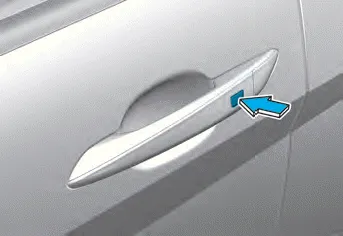
1. Close all doors, engine hood and trunk.
2. Carry the smart key.
3. Either press the door handle button or press the Door Lock button (1) on the smart key.
4. The hazard warning lights will blink.
5. Make sure the doors are locked by pulling the door outside handle.
Information
The door handle button will only operate when the smart key is within 28~40 inches (0.7~1 m) from the outside door handle.
Your HYUNDAI uses a smart key, which you can use to lock or unlock a door (and trunk) and even start the engine even just carrying the key. (1) Door Lock (2) Door Unlock (3) Trunk Open (4) Panic (5) Remote Start
1. Close all doors, engine hood and trunk. 2. Carry the smart key. 3. Either touch the touch sensor on the door handle (the engraved part) or press the Door Lock button (1) on the smart key.
Other information:
Hyundai Elantra (CN7) 2021-2026 Service Manual: Components and components location
C
Hyundai Elantra (CN7) 2021-2026 Service Manual: Heater Core
Repair procedures Replacement1.Disconnect the negative (-) battery terminal. 2.Remove the heater and blower assembly.(Refer to Heater - "Heater Unit") 3.Remove the heater core cover (A) after loosening the mounting screws.4.Pull out the heater core (A) from the heater unit.
Categories
- Manuals Home
- Hyundai Elantra Owners Manual
- Hyundai Elantra Service Manual
- Vehicle Information
- Instrument Panel Overview
- Function settings
- New on site
- Most important about car
