
Hyundai Elantra (CN7): Convenient Features / Manual Climate Control System
Hyundai Elantra (CN7) 2021-2026 Owner's Manual / Convenient Features / Manual Climate Control System
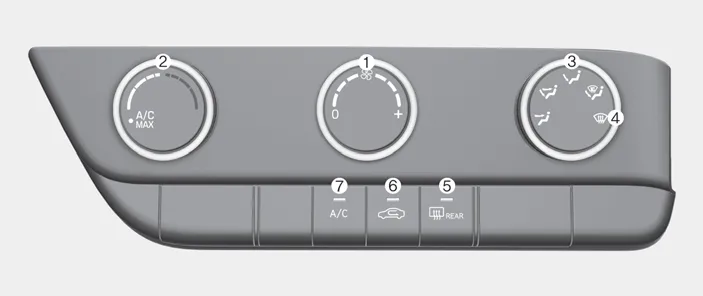
Type A

Type B
1. Fan speed control knob
2. Temperature control knob
3. Mode selection knob
4. Front windshield defroster position
5. Rear window defroster button
6. Air intake control button
7. A/C (Air conditioning) button
A. Wiper speed control MIST – Single wipe OFF – Off INT / --- – Intermittent wipe LO– Low wiper speed HI – High wiper speed B. Intermittent control wipe time adjustment C.
1. Start the engine. 2. Set the mode to the desired position. To improve the effectiveness of heating and cooling, select the mode according to the following: -- Heating: -- Cooling: 3.
Categories
- Manuals Home
- Hyundai Elantra Owners Manual
- Hyundai Elantra Service Manual
- Specifications
- Drive Mode
- Fuse/Relay Panel Description. Engine compartment fuse panel
- New on site
- Most important about car

Copyright © 2026 www.helantra7.com - 0.013