
Hyundai Elantra (CN7): Driver Attention Warning (DAW) / Function settings
Setting
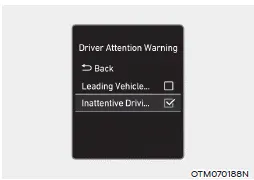
Driver Attention Warning
With the engine on, select or deselect ‘Driver Assistance → Driver Attention Warning’ from the Settings menu to set whether or not to use each function.
-- If ‘Inattentive Driving Warning’ is selected, the system can inform the driver the driver’s attention level and can recommend taking a break when the level falls below a certain level.
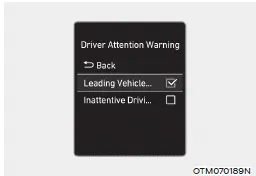
Leading Vehicle Departure Alert
-- If ‘Leading Vehicle Departure Alert’ is selected, the function can inform the driver when the front vehicle departs from a stop.
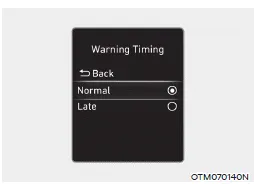
Warning Timing
With the engine on, select ‘Driver Assistance → Warning Timing’ from the Settings menu to change the initial warning activation time for Driver Attention Warning.
When the vehicle is first delivered, Warning Timing is set to ‘Normal’. If you change the Warning Timing, the warning time of other Driver Assistance systems may change.
Information
If the engine is restarted, Driver Attention Warning will maintain the last setting.
Basic function Driver Attention Warning can help determine the driver's attention level by analyzing driving pattern, driving time, etc. while vehicle is being driven.
Basic function System display and warning The basic function of Driver Attention Warning is to inform the driver of their ‘Attention Level’ and to warn the driver to ‘Consider taking a break’.
Other information:
Hyundai Elantra (CN7) 2021-2026 Service Manual: Condenser
Components and components location Components Location[General type]1. Condenser[N Line]1. Condenser Repair procedures Inspection1.Check the condenser fins for clogging and damage. If clogged, clean them with water, and blow them with compressed air.
Hyundai Elantra (CN7) 2021-2026 Service Manual: Components and components location
C
Categories
- Manuals Home
- Hyundai Elantra Owners Manual
- Hyundai Elantra Service Manual
- Engine Control / Fuel System
- General Tightening Torque Table. General information
- Instrument Panel Overview
- New on site
- Most important about car
