
Hyundai Elantra (CN7): Smart Key / Mechanical key
If the Smart Key does not operate normally, you can lock or unlock the driver’s door by using the mechanical key.
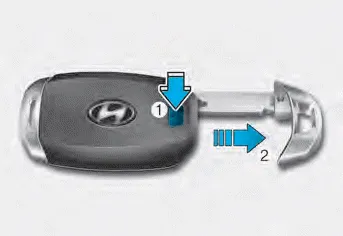
Press and hold the release button (1) and remove the mechanical key (2). Insert the mechanical key into the key hole on the door.
To reinstall the mechanical key, put the key into the hole and push it until a click sound is heard.
You can start the engine without inserting the key. Information If the smart key is not moved for some time, the detection function for smart key operation will pause.
Loss of a smart key A maximum of two Smart Keys can be registered to a single vehicle. If you happen to lose your smart key, you should immediately take the vehicle and remaining keys to your authorized HYUNDAI dealer or tow the vehicle, if necessary.
Other information:
Hyundai Elantra (CN7) 2021-2026 Service Manual: Climate Control Air Filter
Description and operation Description The climate control air filter is located in the blower unit. It eliminates foreign materials and odor. The particle filter performs a role as an odor filter as well as a conventional dust filter to ensure comfortable interior environment.
Hyundai Elantra (CN7) 2021-2026 Service Manual: Components and components location
C
Categories
- Manuals Home
- Hyundai Elantra Owners Manual
- Hyundai Elantra Service Manual
- Instrument Panel Overview
- Front Radar Unit
- Front Bumper
- New on site
- Most important about car
