
Hyundai Elantra (CN7): Rear Door / Rear Door Window Glass
Components and components location
| Component Location |
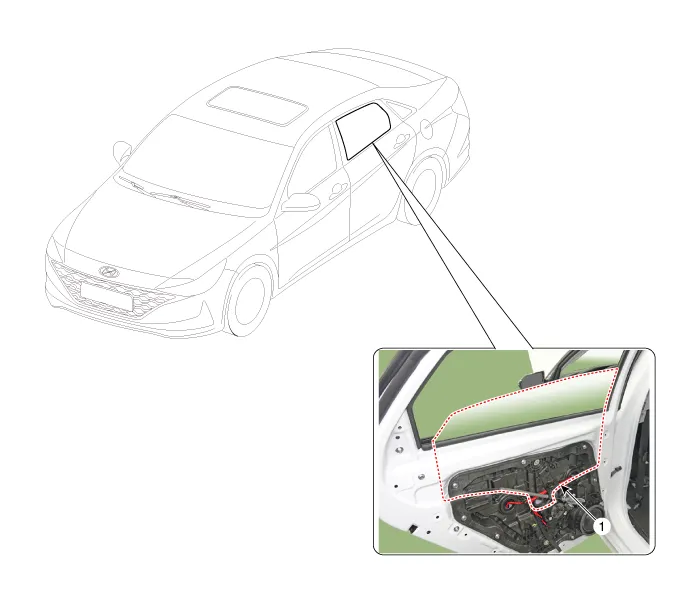
| 1. Rear door window glass |
Repair procedures
| zReplacement |
| 1. | Remove the rear door trim. (Refer to Rear Door - "Rear Door Trim") |
| 2. | Remove the rear door belt inside weatherstrip (A).
|

| 3. | Remove the rear door belt outside weatherstrip (A).
|

| 4. | Loosen the mounting screw, remove the rear door frame garnish (A).
|


| 5. | Loosen the mounting bolt and nuts, remove the rear door channel (A).
|


| 6. | Remove the rear door window glass mounting hole plug (A).
|

| 7. | Carefully adjust the rear door window glass (A) until the bolts are visible, then loosen them. Separate the glass from the glass run and carefully pull the glass out through the window slot.
|


| 8. | To install, reverse the removal procedure.
|

Repair procedures Replacement1.Remove the rear door trim.(Refer to Rear Door - "Rear Door Trim")2.After loosening the mounting screws, remove the rear door inside handle (A).
Components and components location Component Location 1. Rear door module Repair procedures Replacement1.Remove the rear door window glass.
Other information:
Hyundai Elantra (CN7) 2021-2026 Service Manual: Rear Combination Lamp
Repair procedures RemovalOutside Combination Lamp1.Disconnect the negative (-) battery terminal.2.Remove the combination lamp cover (A).3.Disconnect the rear combination lamp connector (A).4.Loosen the mounting nuts and remove the rear conbination lamp (A).
Hyundai Elantra (CN7) 2021-2026 Service Manual: Parking Distance Warning (PDW)
Description and operation Description• PDW consists of 8 sensors (front : 4 units, rear : 4 units) that are used to detect obstacles and transmit the result in three separate warning levels, the first, second and third to IBU via LIN communication.
Categories
- Manuals Home
- Hyundai Elantra Owners Manual
- Hyundai Elantra Service Manual
- Instrument Cluster
- General Tightening Torque Table. General information
- Troubleshooting
- New on site
- Most important about car
