
Hyundai Elantra (CN7): Blower / Blower Motor
Repair procedures
| Inspection |
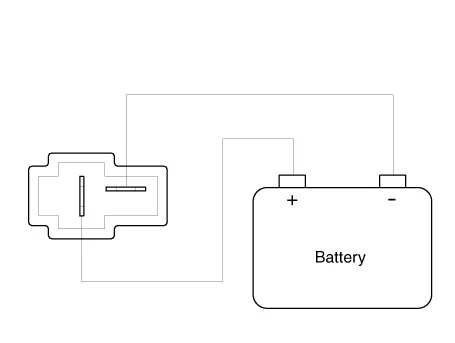
| 1. | Connect the battery voltage and check the blower motor rotation.
|
| Replacement |
| 1. | Disconnect the negative (-) battery terminal. |
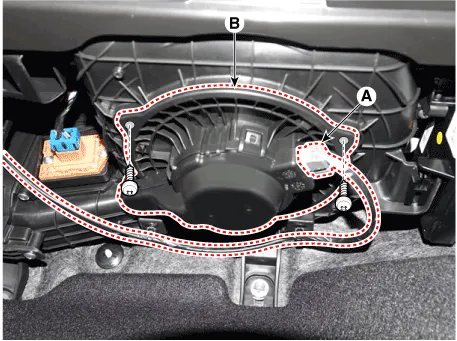
| 2. | Disconnect the blower motor connector (A) and then remove the blower motor (B) after loosening the screws.
|
| 3. | To install, reverse the removal procedure |
Components and components location Component Location1. Blower unit assemblyComponents1. Blower unit assebmly2. Blower upper cover [LH]3. Duct seal4.
Description and operation DescriptionIt is installed to the DATC and adjusts the fan rpm by precisely controlling the voltage applied to the blower motor.
Other information:
Hyundai Elantra (CN7) 2021-2026 Service Manual: Wireless Charging Lamp
Components and positions Components Repair procedures Removal • Handling wireless charging system parts by wet hands may cause electric shock. 1.Disconnect the negative (-) battery terminal.2.Remove the floor console upper cover assembly.
Hyundai Elantra (CN7) 2021-2026 Service Manual: Warning Indicator
Components and components location Components1. BSD Indicator2. Side repeater lamp Repair procedures Inspection1.Disconnect the negative (-) battery terminal.2.Remove the front door trim.(Refer to Body - "Front door trim")3.Disconnect the power door mirror connector from the harness4.
Categories
- Manuals Home
- Hyundai Elantra Owners Manual
- Hyundai Elantra Service Manual
- Engine Control / Fuel System
- Maintenance
- Troubleshooting
- New on site
- Most important about car
