
Hyundai Elantra (CN7): Wireless Power Charger System / Wireless Charging Lamp
Components and positions
| Components |
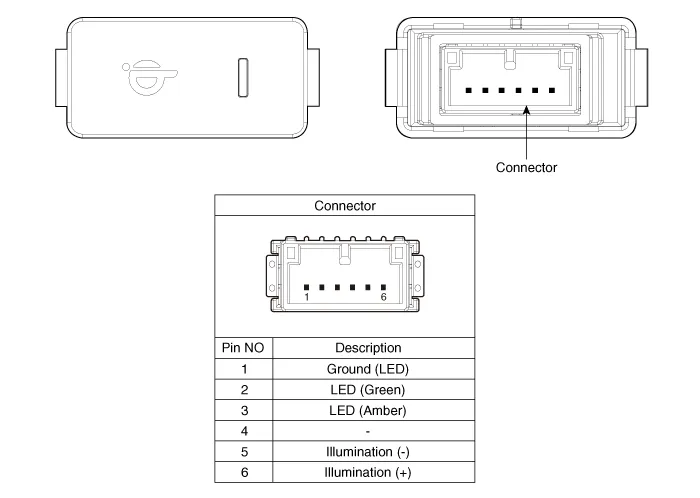
Repair procedures
| Removal |
|

| 1. | Disconnect the negative (-) battery terminal. |
| 2. | Remove the floor console upper cover assembly. (Refer to Body - "Floor Console Upper Cover") |
| 3. | Push the lock pin and remove the wireless charging lamp.
|
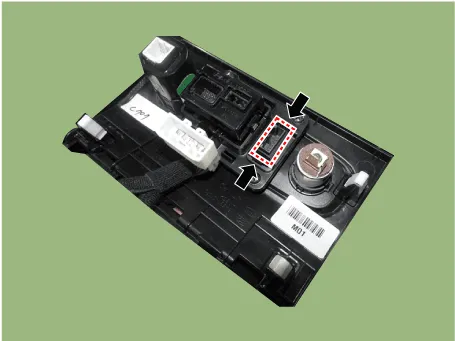
| Installation |
| 1. | Install the wireless charging lamp. |
| 2. | Install the floor console upper cover assembly. |
| 3. | Connect the negative (-) battery terminal. |
Components and positions Components Circuit diagram Circuit Diagram Repair procedures Removal • Handling wireless charging system parts by wet hands may cause electric shock.
Other information:
Hyundai Elantra (CN7) 2021-2026 Service Manual: Power Mosfet
Description and operation DescriptionIt is installed to the DATC and adjusts the fan rpm by precisely controlling the voltage applied to the blower motor. Repair procedures Inspection1.Manually operate the control switch and measure the voltage of the blower motor.
Hyundai Elantra (CN7) 2021-2026 Service Manual: General safety information and caution
General Safety Information and Caution1.Be careful when driving the vehicle using the smart cruise control system as follows.(1)On curves or inclines/declines• The smart cruise control system may have limits to detect distance to the vehicle ahead due to road and traffic conditions.
Categories
- Manuals Home
- Hyundai Elantra Owners Manual
- Hyundai Elantra Service Manual
- Front Radar Unit
- Instrument Cluster
- Engine Mechanical System
- New on site
- Most important about car
