
Hyundai Elantra (CN7): Floor Console / Console Armrest
Components and components location
| Component Location |
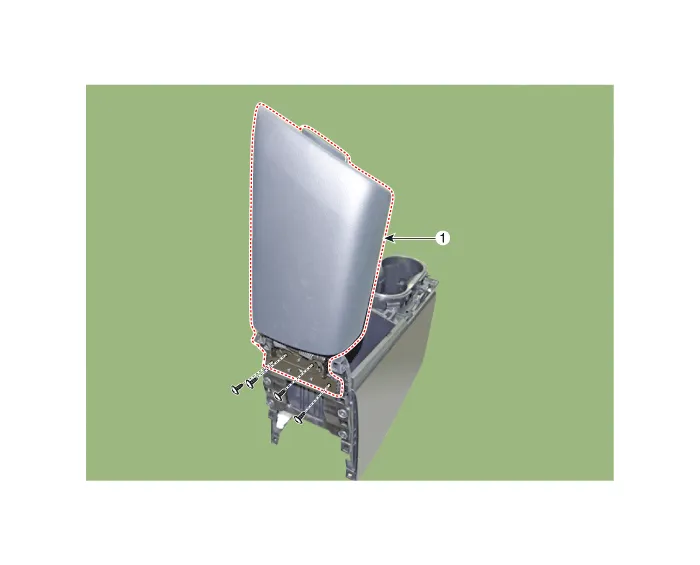
| 1. Console armrest |
Repair procedures
| Replacement |
|

|

| 1. | Remove the floor console assembly. (Refer to Floor Console - "Floor Console Assembly") |
| 2. | Remove the rear console cover. (Refer to Floor Console - "Rear Console Cover") |
| 3. | Loosen the mounting screws and remove the console armrest (A).
|
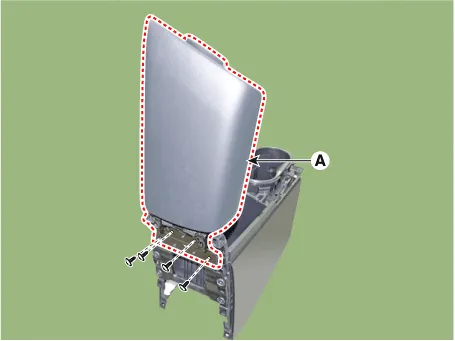
| 4. | To install, reverse the removal procedure.
|

Components and components location Component Location [This illustration shows the LHD type. RHD type is symmetrical.]1. Rear console cover Repair procedures Replacement • When removing with a flat - tip screwdriver or remover, wrap protective tape around the tools to prevent damage to components.
Other information:
Hyundai Elantra (CN7) 2021-2026 Service Manual: Start/Stop Button
Components and components location Component Repair procedures Removal1.Disconnect the negative(-) battery terminal.2.Remove the AVN Head unit.(Refer to Body Electrical System - "AVN(Audio Video Navigation) head unit")3.Loosen the mounting screws and remove the start/stop button (A).
Hyundai Elantra (CN7) 2021-2026 Service Manual: Description and operation
DescriptionRear Corner Radar is a system that measures the relative speed and distance from the following vehicles by using two electromagnetic wave radar sensors attached to the rear bumper, and detects any vehicle within the blind spot zone and gives off alarm.
Categories
- Manuals Home
- Hyundai Elantra Owners Manual
- Hyundai Elantra Service Manual
- Instrument Cluster
- Maintenance
- Drive Mode
- New on site
- Most important about car
