
Hyundai Elantra (CN7): Power Door Mirrors / Power Door Mirror Actuator
Repair procedures
| Removal |
| 1. | Disconnect (-) battery terminal. |
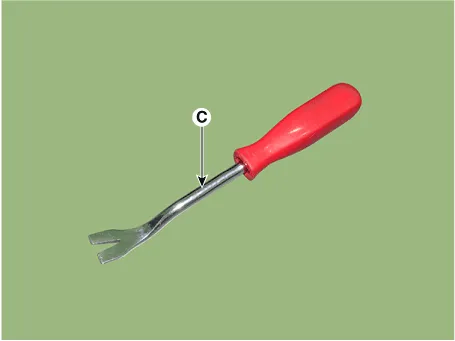
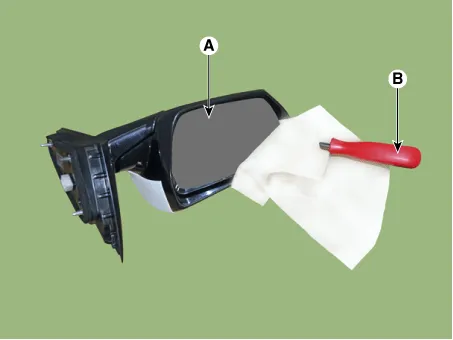
| 2. | Using a fastener remover (C), remove the mirror (A) as illustration below.
|

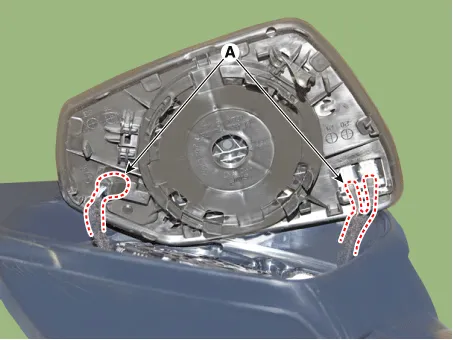
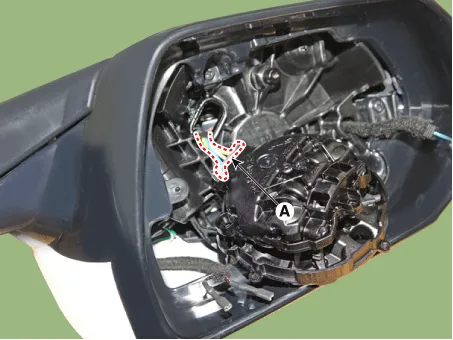
| 3. | Disconnect heat wire connectors (A) and then remove the mirror.
|
| 4. | Remove the mirror actuator (A) mounting screw.
|
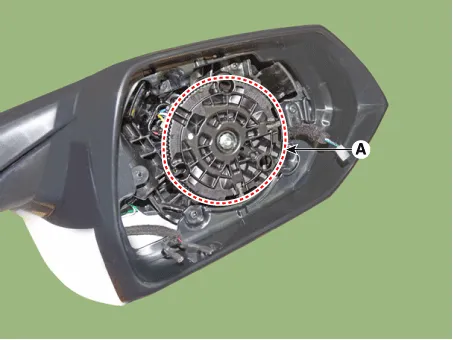
| 5. | Disconnect the connector (A) and then remove the mirror actuator.
|
| Installation |
| 1. | Connect the actuator connector and then install the mirror actuator. |
| 2. | Connect mirror heat wire connector and then install the mirror. |
| 3. | Connect (-) battery terminal then check if mirror works normally. |
Components and components location Components Schematic diagrams Circuit DiagramWithout Mirror FoldingWith Mirror Folding Repair procedures Inspection[Power Window Switch]1.
Components and components location Components1. Warning indicator2. Side repeater lamp Repair procedures Inspection1.Disconnect the negative (-) battery terminal.
Other information:
Hyundai Elantra (CN7) 2021-2026 Service Manual: Rear Combination Lamp
Repair procedures RemovalOutside Combination Lamp1.Disconnect the negative (-) battery terminal.2.Remove the combination lamp cover (A).3.Disconnect the rear combination lamp connector (A).4.Loosen the mounting nuts and remove the rear conbination lamp (A).
Hyundai Elantra (CN7) 2021-2026 Service Manual: Evaporator Temperature Sensor
Description and operation DescriptionThe evaporator temperature sensor will detect the evaporator core temperature and interrupt compressor relay power in order to prevent evaporator from freezing by excessive cooling. The evaporator temperature sensor has the Negative Temperature Coefficient (NTC).
Categories
- Manuals Home
- Hyundai Elantra Owners Manual
- Hyundai Elantra Service Manual
- Brake bleeding procedures
- Integrated Thermal Management Module (ITM)
- Rear Seats
- New on site
- Most important about car
