
Hyundai Elantra (CN7): Driving Convenience / Smart Cruise Control (SCC)
Smart Cruise Control is designed to detect the vehicle ahead and help maintain the desired speed and minimum distance between the vehicle ahead.
Overtaking Acceleration Assist
While Smart Cruise Control is operating, if the system judges that the driver is determined to overtake the vehicle in front, acceleration will be assisted.
Detecting senor

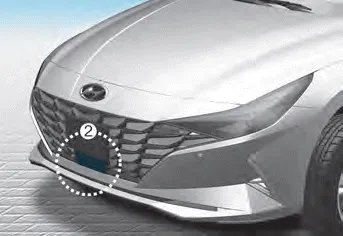
[1] : Front view camera, [2] : Front radar
The front view camera and front radar are used as a detecting sensor to help detect the vehicles in front.
Refer to the picture above for the detailed location of the detecting sensor.
CAUTION
Always keep the front view camera and front radar in good and clean condition to maintain optimal performance of Smart Cruise Control.
For more details on the precautions of the front view camera and front radar, refer to “Forward Collision-Avoidance Assist (FCA)� section in chapter 7.
(1) Cruise indicator (2) Set speed Cruise Control will allow you to drive at speeds above 20 mph (30 km/h) without depressing the accelerator pedal.
Setting [A] : Type A, [B] : Type B To turn on the function Press the Driving Assist button to turn on the system. The speed will be set to the current speed on the cluster.
Other information:
Hyundai Elantra (CN7) 2021-2026 Service Manual: Troubleshooting
Trouble Symptom ChartsTrouble Symptom 1Trouble Symptom 2 Trouble symptom Probable cause Remedy The set vehicle speed varies greatly upward or downward"Surging" (repeated alternating acceleration and deceleration) occurs after settingMalfunction of the vehicle speed se
Hyundai Elantra (CN7) 2021-2026 Service Manual: Desctiprion and operation
DescriptionADAS_PRK is a unit that controls the functions required for ADAS parking. If the ADAS_PRK is applied, the parking distance warning function is also controlled by the ADAS_PRK.System FunctionParking Collision-Avoidance Assist (PCA)PCA is a parking safety system that assists in collision warning and emergency braking in the event of a coll
Categories
- Manuals Home
- Hyundai Elantra Owners Manual
- Hyundai Elantra Service Manual
- Vehicle Information
- Driver assistance system
- Function settings
- New on site
- Most important about car
