
Hyundai Elantra (CN7): Parking Brake System / Parking Brake Switch
Hyundai Elantra (CN7) 2021-2026 Service Manual / Brake System / Parking Brake System / Parking Brake Switch
Repair procedures
| Removal |
| 1. | Turn ignition switch OFF and disconnect the negative (-) battery cable. |
| 2. | Release the parking brake. |
| 3. | Remove the floor console assembly. (Refer to Body - "Floor Console") |
| 4. | Disconnect the parking brake switch connector (A).
|
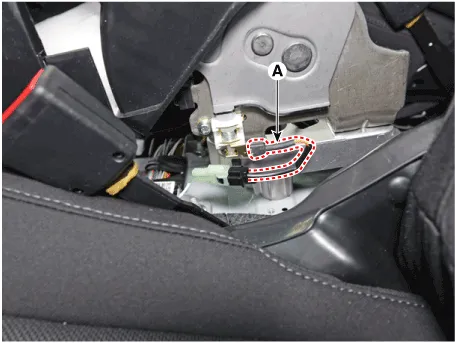
| 5. | Remove the parking brake switch (A) after loosening the screw.
|
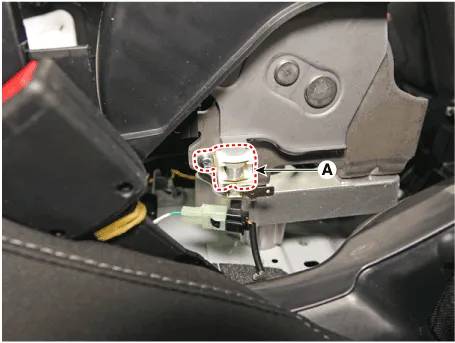
| Installation |
| 1. | To install, reverse the removal procedures. |
Repair procedures Removal1.Turn ignition switch OFF and disconnect the negative (-) battery cable.2.Release the parking brake.3.Remove the floor console assembly.
Repair procedures Removal1.Turn ignition switch OFF and disconnect the negative (-) battery cable.2.Release the parking brake.3.Remove the floor console assembly.
Other information:
Hyundai Elantra (CN7) 2021-2026 Service Manual: Heater Control Unit
Components and components location Component Location1. Heater control unitComponents[Connector A] Pin No Function Pin No Function 1Mode control actuator (Feedback)21Mode control actuator (Vent)2Intake actuator (Feedback)22Mode control actu
Hyundai Elantra (CN7) 2021-2026 Service Manual: Components and components location
C
Categories
- Manuals Home
- Hyundai Elantra Owners Manual
- Hyundai Elantra Service Manual
- Driver assistance system
- Vehicle Information
- Function settings
- New on site
- Most important about car

Copyright В© 2026 www.helantra7.com - 0.0231