
Hyundai Elantra (CN7): ABS(Anti-Lock Brake System) / Front Wheel Speed Sensor
Hyundai Elantra (CN7) 2021-2026 Service Manual / Brake System / ABS(Anti-Lock Brake System) / Front Wheel Speed Sensor
Components and components location
| Components |

| 1. Front wheel speed sensor | 2. Front wheel speed sensor connector |
Repair procedures
| Removal |
| 1. | Turn ignition switch OFF and disconnect the negative (-) battery cable. |
| 2. | Loosen the wheel nuts slightly. Raise the vehicle, and make sure it is securely supported. |
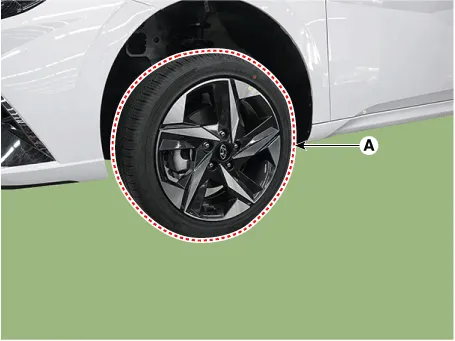
| 3. | Remove the rear wheel and tire (A) from the rear hub.
|

| 4. | Remove the front wheel guard. (Refer to Body - "Front Wheel Guard") |
| 5. | Disconnect the front wheel speed sensor connector (A) and then remove the fixing clip (B).
|

| 6. | Remove the front wheel speed sensor cable braket bolt (A).
|

| 7. | Remove the wheel speed sensor (A) from the Knuckle after loosening the mounting bolt.
|

| Installation |
| 1. | To install, reverse the removal procedure. |
| Inspection |
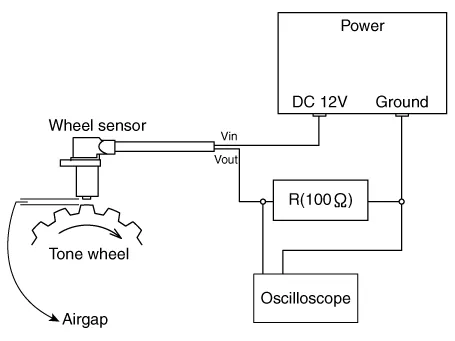
| 1. | Measure the output voltage between the terminal of the wheel speed sensor and the body ground.
|
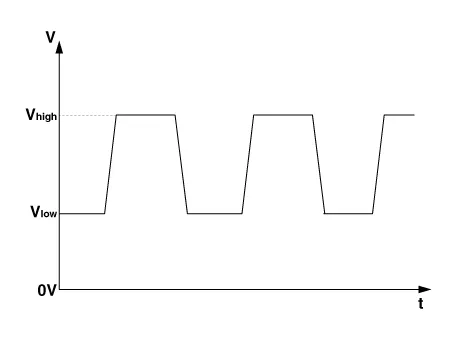
| 2. | Compare the change of the output voltage of the wheel speed sensor to the normal change of the output voltage as shown below.
|
Components and components location Components[LHD]1. Front - right (FR)2. Rear - left (RL)3. Rear - right (RR)4. Front - left (FL)5. MC26. MC17. ABS control module (HECU)8.
Components and components location Components[Rear torsion beam disc brake type]1. Rear wheel speed sensor2. Rear wheel speed sensor connector[Rear multi link disc brake type]1.
Other information:
Hyundai Elantra (CN7) 2021-2026 Service Manual: Special service tools
S
Hyundai Elantra (CN7) 2021-2026 Service Manual: Auto Defoging Actuator
Description and operation DescriptionThe auto defogging sensor is installed on front window glass. The sensor judges and sends signal if moisture occurs to blow out wind for defogging. The air conditioner control module receives a signal from the sensor and restrains moisture and eliminates defog by the intake actuator, A/C, auto defogging actua
Categories
- Manuals Home
- Hyundai Elantra Owners Manual
- Hyundai Elantra Service Manual
- Engine Mechanical System
- Body Electrical System
- Function settings
- New on site
- Most important about car

Copyright © 2026 www.helantra7.com - 0.0172