
Hyundai Elantra (CN7): Intelligent Speed Limit Assist (ISLA) / Function operation
Function warning and control
Intelligent Speed Limit Assist will warn and control the vehicle by ‘Displaying speed limit’, ‘Warning overspeed’ and ‘Changing set speed’.
Information
Function warning and control are described based on the Offset set to '0'. For details on Offset setting, refer to the “System Settings�.
Displaying speed limit
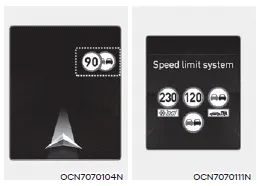
Speed limit information is displayed on the instrument cluster.
Information
- Intelligent Speed Limit Assist provides additional road sign information in addition to speed limit. The additional road sign information provided may vary according to your country.
- Supplementary sign displayed under the speed limit or overtaking restriction sign means the conditions under which the signs must be followed. If supplementary sign is not recognized, it will be displayed as blank.
Warning overspeed
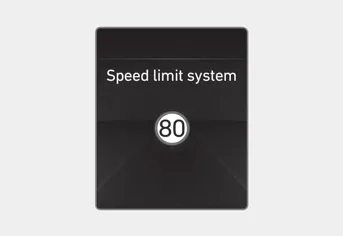
When driving at a speed higher than the displayed speed limit, the red speed limit indicator will blink.
Changing set speed
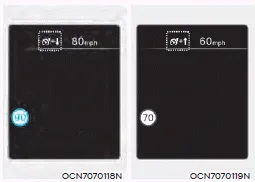
If the speed limit of the road changes during the operation of Manual Speed Limit Assist or Smart Cruise Control, an arrow in the direction of up or down is displayed to inform the driver that the set speed needs to be changed. At this time, the driver can change the set speed according to the speed limit by using the + or – switch on the steering wheel.
WARNING
- If the Offset is set over ‘0’, the set speed will change to a higher speed than the speed limit of the road. If you want to drive below the speed limit, set the Offset under '0' or use the – switch on the steering wheel to lower the set speed.
- Even after changing the set speed according to the speed limit of the road, the vehicle can still be driven over the speed limit. If necessary, depress the brake pedal to reduce your driving speed.
- If the speed limit of the road is under 20 mph (30 km/h), the set speed change function will not work.
- Intelligent Speed Limit Assist operates using the speed unit in the instrument cluster set by the driver. If the speed unit is set to a unit other than the speed unit used in your country, Intelligent Speed Limit Assist may not operate properly.
Information
For more details on function operation of Smart Cruise Control, refer to “Smart Cruise Control (SCC)� section in chapter 7.
Setting Speed Limit With the engine on, select or deselect ‘Driver Assistance → Speed Limit’ from the Settings menu to set whether or not to use each function.
Function malfunction When Intelligent Speed Limit Assist is not working properly, the ‘Check speed limit system’ warning message will appear on the cluster.
Other information:
Hyundai Elantra (CN7) 2021-2026 Service Manual: Front View Camera Unit
Schematic diagrams Circuit Diagram Repair procedures Removal1.Disconnect the negative (-) battery terminal.2.Remove the cover (A) & (B).3.Disconnect the front view camera unit connector (A).4.Separate the fixed points (A) of coupler.5.
Hyundai Elantra (CN7) 2021-2026 Service Manual: Description and operation
DescriptionThe cruise control system is engaged by the cruise "ON/OFF" main switch located on right of steering wheel column. The system has the capability to cruise, coast, accelerate and resume speed.It also has a safety interrupt, engaged upon depressing brake or shifting select lever.
Categories
- Manuals Home
- Hyundai Elantra Owners Manual
- Hyundai Elantra Service Manual
- Specifications
- General Tightening Torque Table. General information
- Integrated Thermal Management Module (ITM)
- New on site
- Most important about car
