
Hyundai Elantra (CN7): Lighting System / Rheostat
Components and components location
| Components |
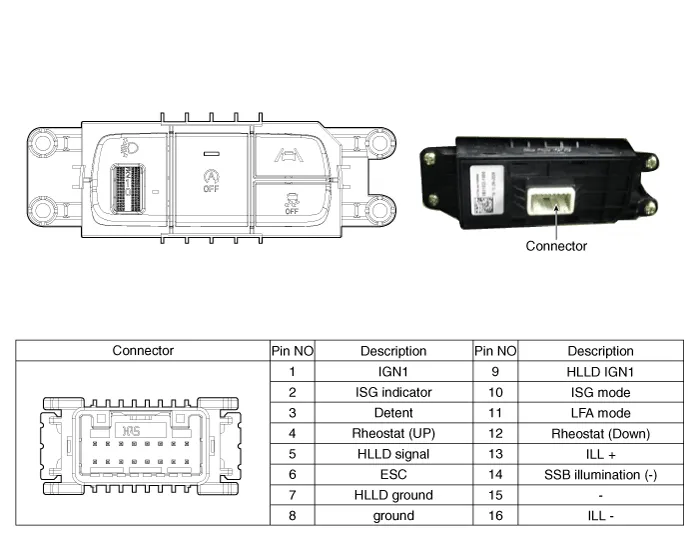
Repair procedures
| Replacement |
| 1. | Disconnect the negative (-) battery terminal. |
| 2. | Remove the crash pad lower panel (A). (Refer to Body - "Crash Pad Lower Panel") |
| 3. | Loosen the mounting screw and remove the crash pad lower switch (A).
|
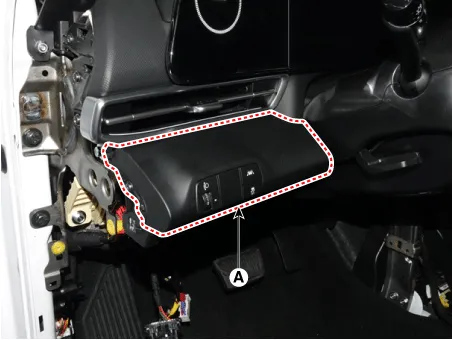
| 4. | Disconnect the crash pad lower switch connector (A).
|

| 5. | To install, reverse the removal procedure. |
Repair procedures Removal1.Disconnect the negative (-) battery terminal.2.Remove the crash pad airvent [RH].(Refer to Body - "Crash Pad Airvent")3.Loosen the mounting screws and remove the harzard lamp switch (A).
Repair procedures Removal1.Disconnect the negative (-) battery terminal.2.Remove the front bumper.(Refer to Body - "Front Bumper Cover")3.Remove the head lamp.
Other information:
Hyundai Elantra (CN7) 2021-2026 Service Manual: Compressor
Description and operation DescriptionThe compressor is the power unit of the A/C system.It is located on the side of engine block and driven by a V-belt of the engine.The compressor changes low pressure and low temperature refrigerant gas into high pressure and high temperature refrigerant gas.
Hyundai Elantra (CN7) 2021-2026 Service Manual: Troubleshooting
Diagnosis with Diagnostic tool1.In the body electrical system, failure can be quickly diagnosed by using the vehicle diagnostic system (Diagnostic tool).The diagnostic system (Diagnostic tool) provides the following information.(1)Fault Code Searching : Checking failure and code number (DTC)(2)Data Analysis : Checking the system input/output data s
Categories
- Manuals Home
- Hyundai Elantra Owners Manual
- Hyundai Elantra Service Manual
- Rear Seats
- Function settings
- Instrument Panel Overview
- New on site
- Most important about car
