
Hyundai Elantra (CN7): Infotainment System / Steering wheel audio control
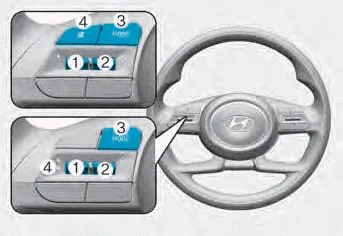
The steering wheel audio control switches are installed for your convenience.
NOTICE
Do not operate audio remote control buttons simultaneously.
VOLUME (VOL + / VOL -) (1)
- Move the VOLUME toggle switch up to increase volume.
- Move the VOLUME toggle switch down to decrease volume.
SEEK/PRESET (Ë„/Ë… ) (2)
• RADIO mode
It will function as the AUTO SEEK select switch. It will SEEK until you release the switch.
• MEDIA mode
It will function as the FF/REW switch. If the SEEK/PRESET toggle switch is moved up or down, it will function in the following modes.
• RADIO mode
It will function as the PRESET STATION UP/DOWN switch.
• MEDIA mode
It will function as the TRACK UP/ DOWN switch.
MODE (
 ) (3)
) (3)
Press the MODE button to select Radio.
MUTE (
 ) (4)
) (4)
Information
Detailed information for audio control buttons are described in the following pages in this chapter.
Infotainment system
If your vehicle is equipped with additional navigation, please refer to the infotainment system manual separately supplied.
Shark fin antenna (1) The shark fin antenna receives data transmitted from base stations and satelliltes (for example: GPS, Sirus XM, LTE) and also transmits to base stations (for example: LTE).
A wide range of infotainment functions can be commanded with voice recognition.
Other information:
Hyundai Elantra (CN7) 2021-2026 Service Manual: Auto Lighting Control System
Description and operation DescriptionIt's a system that uses illumination sensor to automatically turn ON the tail lamp and head lamp based on the change in surrounding environment's illumination condition. It activates when the vehicle enters/exits tunnel, or when the illumination condition in surrounding environment changes due to rain, snow, or
Hyundai Elantra (CN7) 2021-2026 Service Manual: Refrigerant Line
Components and components location Components Location1. Refrigerant Pipe Assembly Repair procedures Replacement1.If the compressor is marginally operable, run the engine at idle speed, and let the air conditioning work for a few minutes, then shut the engine off.
Categories
- Manuals Home
- Hyundai Elantra Owners Manual
- Hyundai Elantra Service Manual
- Maintenance
- Fuse/Relay Panel Description. Engine compartment fuse panel
- Specifications
- New on site
- Most important about car
