
Hyundai Elantra (CN7): Infotainment System / USB Port
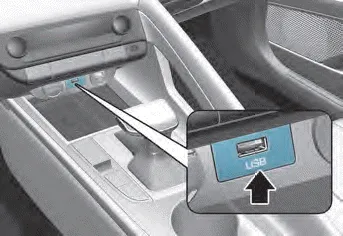
You can use an USB port to plug in an USB.
Information
When using a portable audio device connected to the power outlet, noise may occur during playback. If this happens, use the power source of the portable audio device.
NOTICE If you install an aftermarket HID head lamp, your vehicle’s audio and electronic devices may not function properly. Prevent chemicals such as perfume, cosmetic oil, sunscreen, hand cleaner, and air freshener from contacting the interior parts because they may cause damage or discoloration.
Shark fin antenna (1) The shark fin antenna receives data transmitted from base stations and satelliltes (for example: GPS, Sirus XM, LTE) and also transmits to base stations (for example: LTE).
Other information:
Hyundai Elantra (CN7) 2021-2026 Service Manual: Mood Lamp
Repair procedures RemovalMood lamp unit1.Disconnect the negative (-) battery terminal.2.Remove the main crash pad assembly.(Refer to Body - "Main Crash Pad Assembly")3.Loosen the mounting screws and remove the main crash pad air duct (A).4.Loosen the mounting screws and remove the mood lamp unit (A).
Hyundai Elantra (CN7) 2021-2026 Service Manual: Description and operation
Description and operation The System may be limited when • The radar sensor or camera is blocked with a foreign object or debris.• The camera lens is contaminated due to tinted filmed or coated windshield, damaged glass, or stuck of foreign matter (sticker, bug, etc.
Categories
- Manuals Home
- Hyundai Elantra Owners Manual
- Hyundai Elantra Service Manual
- Body Electrical System
- Front Radar Unit
- Fuse/Relay Panel Description. Engine compartment fuse panel
- New on site
- Most important about car
