
Hyundai Elantra (CN7): Crash Pad / Glove Box Housing Cover
Components and components location
| Component Location |
| [This illustration shows the LHD type. RHD type is symmetrical.] |
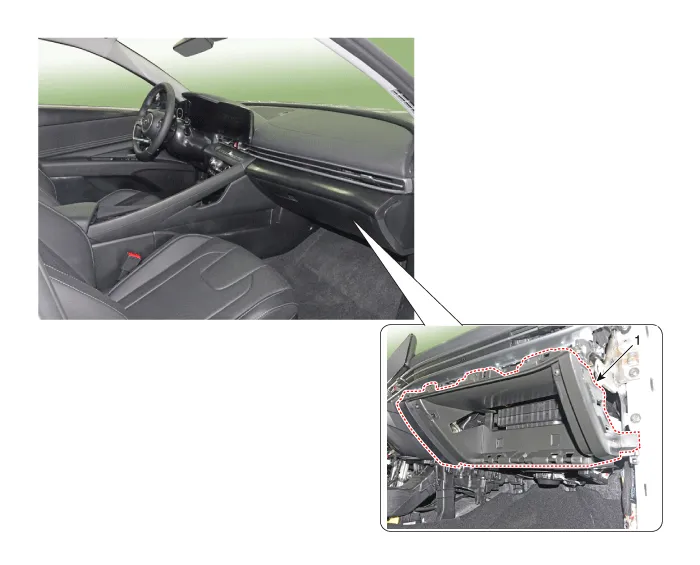
| 1. Glove box housing cover |
Repair procedures
| Replacement |
|

|

| 1. | Remove the golve box. (Refer to Crash Pad - "Glove Box") |
| 2. | Remove the crash pad side cover [RH]. (Refer to Crash Pad - "Crash Pad Side Cover") |
| 3. | (Remove the crash pad garnish [RH]. (Refer to Crash Pad - "Crash Pad Garnish") |
| 4. | Loosen the mounting screws and bolts, remove the glove box housing cover (A).
|
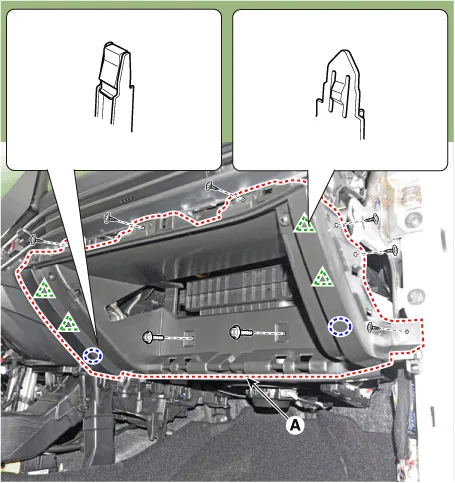
| 5. | To install, reverse the removal procedure.
|

Components and components location Components Location[This illustration shows the LHD type. RHD type is symmetrical.]1. Glove box Repair procedures Replacement • When removing with a flat - tip screwdriver or remover, wrap protective tape around the tools to prevent damage to components.
Components and components location Component Location [This illustration shows the LHD type. RHD type is symmetrical.]1. Steering column shroud upper panel2.
Other information:
Hyundai Elantra (CN7) 2021-2026 Service Manual: Components and components location
C
Hyundai Elantra (CN7) 2021-2026 Service Manual: Troubleshooting
TroubleshootingDiagnosis with Diagnostic tool1.In the body electrical system, failure can be quickly diagnosed by using the vehicle diagnostic system (Diagnostic tool).The diagnostic system (Diagnostic tool) provides the following information.1)Fault Code Searching : Checking failure and code number (DTC)2)Data Analysis : Checking the system input/
Categories
- Manuals Home
- Hyundai Elantra Owners Manual
- Hyundai Elantra Service Manual
- Front Bumper
- Driver assistance system
- Troubleshooting
- New on site
- Most important about car
