
Hyundai Elantra (CN7): AVN System / Mic
Repair procedures
| Inspection |
| 1. | Disconnector the negative (-) battery terminal. |
| 2. | Remove the overhead console lamp. (Refer to Body Electrical System - "Overhead Console Lamp") |
| 3. | Remove the overhead console cover after loosening the screws.
|
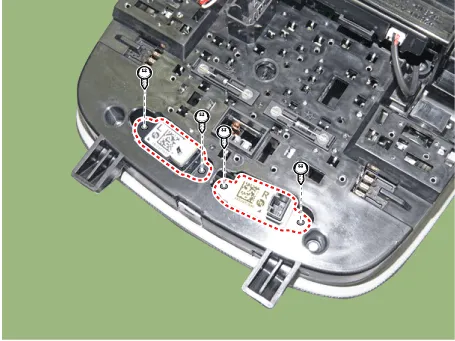
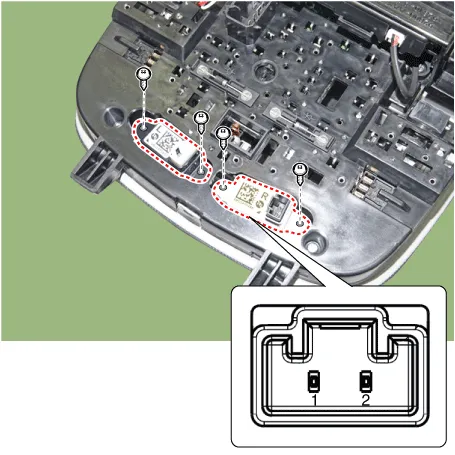
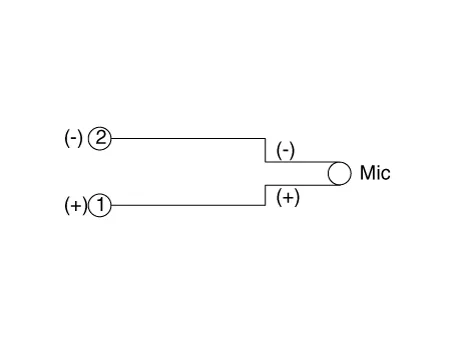
| 4. | Check the continuity of between terminals.
|
Description and operation DescriptionThe multimedia jack on the console upper cover is for customers who like to listen to external portable music players like the MP3 etc.
Components and components location Components Repair procedures Removal10.25" Cluster + 10.25" Monitor • Take care not to scratch the crash pad and related parts.
Other information:
Hyundai Elantra (CN7) 2021-2026 Service Manual: Special service tools
Special Service Tools Tool Name / Number Illustration Description LKA Compensator(09890-3V100)Used for compensating front view camera unitBCW Sensor Correction Tool Set(09958-3T500)Used to correct the blind-spot radar unit.
Hyundai Elantra (CN7) 2021-2026 Service Manual: Rear Corner Radar Unit
Specifications Specifications Items Blind-Spot Collision Warning (BCW) Blind-Spot Collision- Avoidance Assist-Rear (BCA-R) Rated voltageDC 12VOperating voltage9V - 16VOperating speed30 km/h - 255 km/h60 km/h - 180 km/hSensible distance70m Curvature radiusStart : More
Categories
- Manuals Home
- Hyundai Elantra Owners Manual
- Hyundai Elantra Service Manual
- Body (Interior and Exterior)
- Front Bumper
- Instrument Cluster
- New on site
- Most important about car
