
Hyundai Elantra (CN7): Interior Trim / Rear Wheel House Trim
Components and components location
| Component Location |

| 1. Rear wheel house trim |
Repair procedures
| Replacement |
|

|

| 1. | Remove the rear seat cushion assembly. (Refer to Rear Seat - "Rear Seat Assembly") |
| 2. | Using screwdriver or remover, remove the rear door scuff trim (A).
|
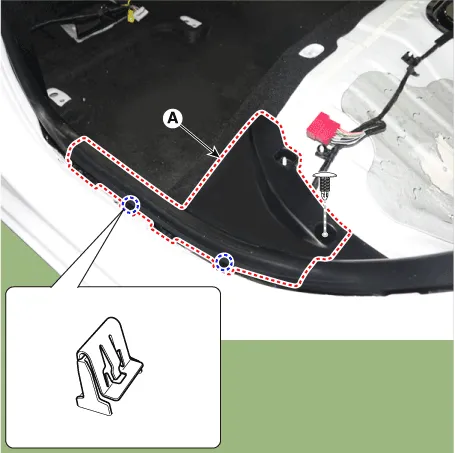
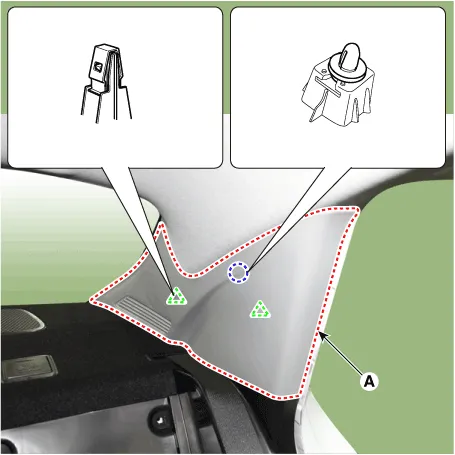
| 3. | Using screwdriver or remover, remove the rear pillar trim (A).
|
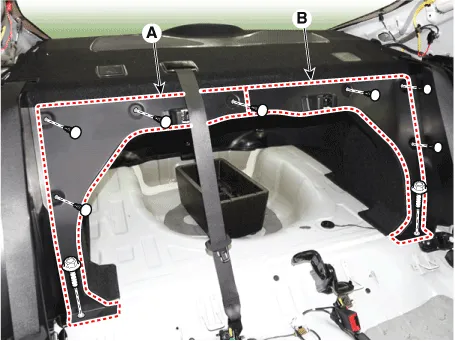
| 4. | Loosen mounting clips and bolts, remove the luggage partition side trim (A) and (B).
|
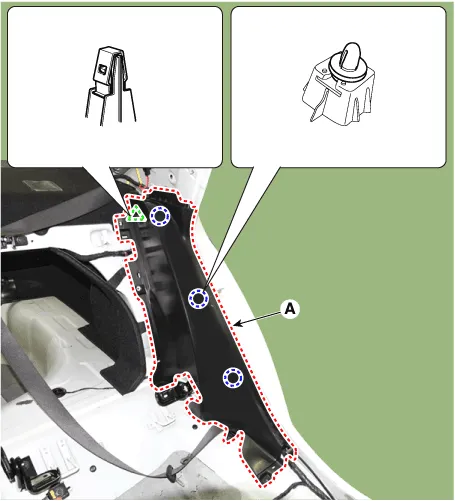
| 5. | After loosening the mounting bolts, remove the rear wheel house trim (A).
|
| 6. | To install, reverse the removal procedure.
|
Components and components location Component Location 1. Rear pillar trim Repair procedures Replacement • When removing with a flat - tip screwdriver or remover, wrap protective tape around the tools to prevent damage to components.
Components and components location Component Location 1. Rear package tray trim Repair procedures Replacement • When removing with a flat - tip screwdriver or remover, wrap protective tape around the tools to prevent damage to components.
Other information:
Hyundai Elantra (CN7) 2021-2026 Service Manual: High Mounted Stop Lamp
Repair procedures Removal1.Disconnect the negative (-) battery terminal.2.Remove the rear package tray trim.(Refer to Body - "Rear Package Tray Trim")3.Loosen the mounting screws and remove the high mounted stop lamp (A).Installation1.Install the high mounted stop lamp.
Hyundai Elantra (CN7) 2021-2026 Service Manual: Front Radar Unit
Components and components location Components Location1. Front rader unit Specifications Specification Item Specification Power supply (V)12Operation voltage (V)9 - 16 Schematic diagrams Circuit DiagramTerminal function Pin No Te
Categories
- Manuals Home
- Hyundai Elantra Owners Manual
- Hyundai Elantra Service Manual
- Engine Control / Fuel System
- General Tightening Torque Table. General information
- Troubleshooting
- New on site
- Most important about car
