
Hyundai Elantra (CN7): Driving Safety / Forward Collision–Avoidance Assist (FCA) (sensor fusion)
Basic function

Forward Collision-Avoidance Assist is designed to help detect and monitor the vehicle ahead or help detect a pedestrian or cyclist in the roadway and warn the driver that a collision is imminent with a warning message and an audible warning, and if necessary, apply emergency braking.
Junction Turning function
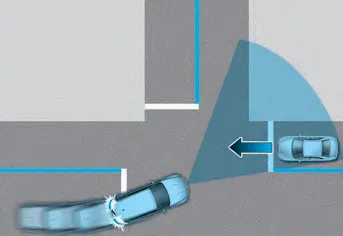
Junction Turning function will help avoid a collision with an oncoming vehicle in an adjacent lane when turning left at a crossroad with the turn signal on by applying emergency braking.
Detecting sensor

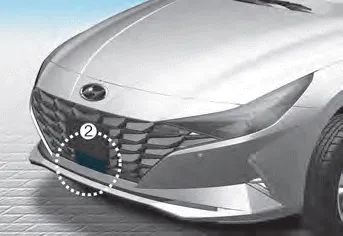
[1] : Front view camera, [2] : Front radar
Refer to the picture above for the detailed location of the detecting sensors.
CAUTION
Take the following precautions to maintain optimal performance of the detecting sensor:
- Never disassemble the detecting sensor or sensor assembly, or apply any impact on it.
- If the detecting sensors have been replaced or repaired, we recommend that you have your vehicle inspected by an authorized HYUNDAI dealer.
- Never install any accessories or stickers on the front windshield, or tint the front windshield.
- Pay extreme caution to keep the front view camera dry.
- Never place any reflective objects (i.e. white paper, mirror) over the dashboard. Any light reflection may prevent the system from functioning properly.
- Do not apply license plate frame or objects, such as a bumper sticker, film or a bumper guard, near the front radar cover.
- Always keep the front radar and cover clean and free of dirt and debris. Use only a soft cloth to wash the vehicle. Do not spray pressurized water directly on the sensor or sensor cover.
- If unnecessary force has been applied to the radar or around the radar, Forward Collision-Avoidance Assist may not properly operate even though a warning message does not appear on the cluster. We recommend that the vehicle be inspected by an authorized HYUNDAI dealer.
- Use only genuine parts to repair or replace a damaged front radar cover. Do not apply paint to the front radar cover.
- Function settings
- Function operation
- Function malfunction and limitations
- System disabled
- Limitations of the function
- Lane Keeping Assist (LKA)
- Function settings
- Function operation
- Function malfunction and limitations
Forward Collision-Avoidance Assist may not operate normally, OR the function may operate unexpectedly under the following circumstances: The detecting sensor or the surroundings are contaminated or damaged The temperature around the front view camera is high or low The camera lens is contaminated due to tinted, filmed or coated windshield, damaged glass, or stuck of foreign material (sticker, bug, etc.
Setting Forward Safety With the engine on, select or deselect ‘Driver Assistance → Forward Safety’ from the Settings menu to set whether or not to use each function.
Other information:
Hyundai Elantra (CN7) 2021-2026 Service Manual: Blower Resistor (Manual)
Repair procedures Inspection1.Measure the resistance between the terminals.2.The measured resistance is not within specification, the blower resistor must be replaced. (After removing the resistor)Replacement1.Disconnect the negative (-) battery terminal.
Hyundai Elantra (CN7) 2021-2026 Service Manual: ADAS Parking ECU (ADAS_PRK)
Components and components location Components and Components Location Repair procedures Removal • Use a plastic panel removal tool to remove interior trim pieces without marring the surface.• Take care not to bend or scratch the trim and panels.
Categories
- Manuals Home
- Hyundai Elantra Owners Manual
- Hyundai Elantra Service Manual
- Maintenance
- Integrated Thermal Management Module (ITM)
- Body (Interior and Exterior)
- New on site
- Most important about car
